
Documentation » Developer and automation
Developer hooks and scheduled work in MailHawk
On this page
Need to adjust cleanup behavior or extend MailHawk’s abilities? Use the documented hooks instead of editing plugin files. Test changes on a staging site and keep customizations in an appropriate custom plugin so updates do not overwrite them.
The values below are the defaults in MailHawk, not delivery guarantees. WordPress scheduled tasks may run late, and receiving services control final delivery. MailHawk has no filters for webhook registration, the Test screen’s From picker, Site Health checks, or the wait while MailHawk is turning email away.
Cleanup and retention filters
mailhawk/log_trim_batch_size receives the batch-size integer and returns an integer. The default is 1000 log entries per delete query, with an effective minimum of one. A large value can increase database load; making it larger does not guarantee cleanup finishes sooner.
mailhawk/quarantine_retention_days receives the default of 30 and returns a day count. There is no quarantine setting on the Settings screen. Effective quarantine retention is the larger of this value and the ordinary Log retention setting (14 days by default, effective minimum one day).
mailhawk/bounce_memory_days receives the bounce-memory day count, default 90, and returns a day count. Bounces older than this stop adding risk, and the quarantine report stops counting them. It does not delete recipient records.
mailhawk/hard_bounce_risk receives the per-bounce risk weight, default 3, and returns the weight. At most three recent bounces count. An email is held when a recipient’s risk reaches 5, so with the default weight two recent bounces are enough on their own. Do not weaken recipient protections to bypass complaints or send to invalid addresses.
mailhawk/assess_risk receives ($risk, $email_address) and returns the final integer risk. It is not called for trusted or blocked recipients, the site admin email, or addresses on the site’s own domain. With Groundhogg active, MailHawk uses it to add an engagement score. That score is cached for mailhawk/risk_factor_cache_seconds (default one week, 604800). New contacts get a grace period of mailhawk/new_contact_grace_days (default 30; 0 turns the grace period off).
Cleanup deletes expired entries in batches, using site-time cutoffs. When a run exhausts its available time with work remaining, it schedules a continuation one minute later. Releasing, resending, or retrying updates the entry’s send time for retention.
Webhook batching
mailhawk/webhook_batch_interval receives an interval in seconds, default 900, and returns seconds. Zero disables batching; other values are clamped to 60–86400 seconds.
The value is sent when MailHawk registers the webhook (on connect, or with Try again in the webhook warning) or updates it during a plugin update. Changing the filter alone does not change an existing remote subscription. Since 1.5.1, a failed webhook update during a plugin update is recorded and shown as the webhook warning, and sites whose 1.4.0 update failed silently are checked again.
Do not bypass webhook signature verification. The listener intentionally rejects requests without a valid signature.
Delivery-sync filters
- mailhawk/delivery_sync_min_age: integer seconds, default 900. The newest eligible messages are at least this old.
- mailhawk/delivery_sync_max_age: integer seconds, default 604800 (seven days). Excludes older messages from the normal catch-up query.
- mailhawk/delivery_sync_max_requests: integer request count, default 10, effective minimum one per run. Each request covers up to 100 log entries.
- mailhawk/delivery_sync_unsupported_ttl: integer seconds, default 21600 (six hours), effective minimum 60. Controls the pause when the service does not support the status endpoint.
These filters return values, not query results. Keep minimum and maximum ages sensible and avoid aggressive polling.
mailhawk/delivery_sync_failed is an action with ($error, $wait): a WP_Error and the pause duration in seconds. Use it for appropriate diagnostics, not to resend the message. The default pause for other errors is 30 minutes; rate-limited responses wait as long as the service asks, up to one hour.
The scheduled catch-up runs every 15 minutes for accepted log entries still Sent or Delayed. It is the only source of the Delivered status, because the site’s webhook is not subscribed to delivery events. It requires a connected, unsuspended site with ordinary logging enabled, and respects its pause state.
To check scheduled work without code, open Tools > Site Health > Info > MailHawk. It shows the next update of the email log, whether that update is paused and why, until when MailHawk is turning email away, and the webhook address. It never shows the API key.
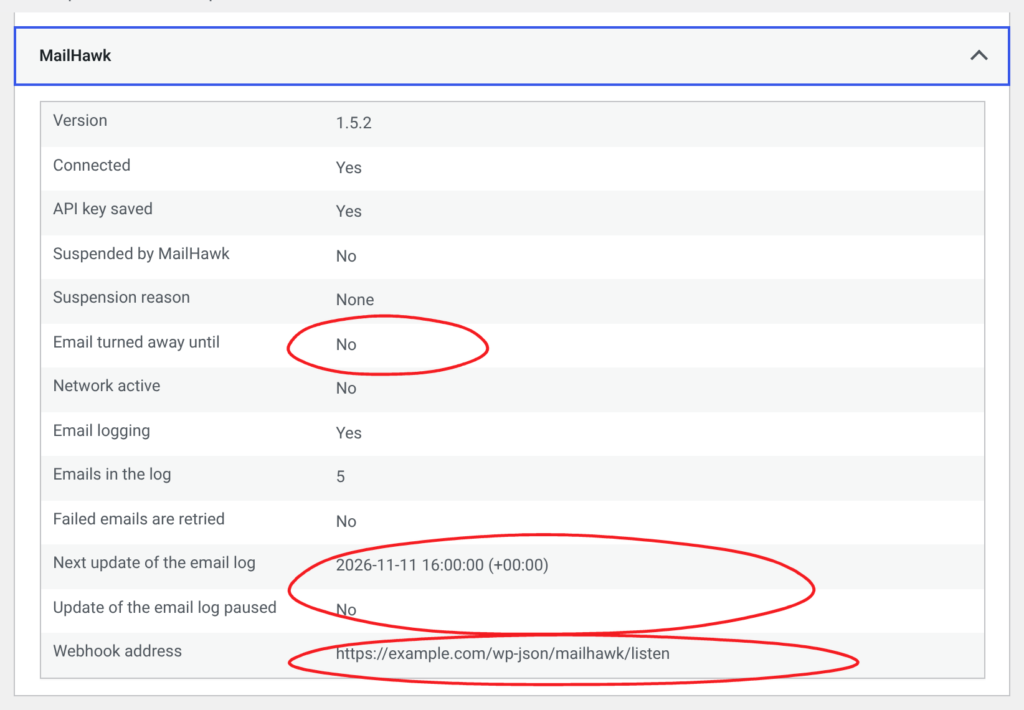
Complaint and bounce actions
mailhawk/spam_complaint is an action with ($email_address, $msg_id, $complaint). These are the recipient address, the message ID, and an array of complaint details from the service, such as feedback_type and reported_by. It runs for every complaint event received, including a repeated delivery of the same report.
mailhawk/bounced is an action with ($email_address, $msg_id). It runs only when the recipient’s mail server turned the email down. Failures on MailHawk’s side, such as timeouts, rate limits, or a cancelled hold, do not trigger it. For a logged email, it runs once, whether the webhook or the delivery-status catch-up records the bounce first.
Make integrations idempotent and protect personal data in logs. Do not assume every callback represents a unique real-world incident: services can redeliver events. The complaint digest skips a repeated report for the same message and address, but your own callbacks still see each delivery. An action should not be used as a reason to start another marketing send.
mailhawk/quarantine_notice_failed is an action with ($count), the number of emails waiting in quarantine, when the quarantine reminder could not be sent. The next quarantined email schedules another attempt.
DNS screen filters
mailhawk/second_level_suffixes receives a string array of two-part suffixes that domains are registered under, such as co.uk and com.au, and returns the list. A three-part domain ending in one of these is not treated as a subdomain. That decides whether the DNS screen and the Copy instructions text explain how to add records in a parent domain’s DNS.
Scheduled event names
These are scheduled callbacks, not public HTTP endpoints:
- mailhawk_trim_log_entries runs daily, with a one-minute continuation when cleanup has more work.
- mailhawk_retry_failed_emails runs hourly. With logging and retries enabled, it considers failed entries with no service message ID and attempts remaining. It does not automatically resend accepted messages that later failed delivery. It skips its run while MailHawk is turning email away, and an attempt MailHawk turned away does not use up a retry.
- mailhawk_sync_delivery_status uses the mailhawk_fifteen_minutes schedule. Further batches can schedule a one-minute continuation.
- mailhawk/send_complaint_digest is a single event scheduled about ten minutes after the first queued complaint, not a fixed recurring ten-minute newsletter. One digest holds up to 200 complaints.
- mailhawk/send_quarantine_notice is a single event scheduled when an email is quarantined, at least ten minutes later and no sooner than a day after the last reminder. It emails the site admin address only if emails are still waiting.
The old mailhawk/monthly usage event was removed, and updating clears it. Uninstalling clears the trim, retry, and delivery-sync events whether or not data is deleted.
These times depend on WordPress cron processing. Do not invoke send/retry/digest callbacks as harmless status checks. Check current state before repeating an operation after an uncertain response.
Ability extension hooks
MailHawk registers its abilities with the WordPress Abilities API, available in WordPress 6.9 and later.
mailhawk/abilities/enabled receives a boolean, defaults to true, and returns whether MailHawk registers its ability categories and abilities. Returning false disables that registration; it does not revoke unrelated integration credentials.
mailhawk/abilities/register_categories is a zero-argument action during category registration. Add-ons can use MailHawk\Abilities\Abilities::add_category($slug, $args), where $args contains the category label and description.
mailhawk/abilities/register_abilities is a zero-argument action during ability registration. Add-ons can use MailHawk\Abilities\Abilities::add_ability($class) for a class extending MailHawk\Abilities\Ability. The base permission check requires manage_options. Custom abilities still need truthful schemas, appropriate permissions, and accurate side-effect annotations.
Additional ability filters:
- mailhawk/abilities/max_body_length receives an integer character limit, default 50000, for a requested email body. The result is converted to a non-negative integer. Zero truncates a nonempty body to an empty string; it does not mean unlimited. The response reports body_truncated.
- mailhawk/abilities/reserved_tlds receives the string array local, localhost, test, invalid, example, lan, internal and returns the list of top-level domains that add-domain rejects. Do not weaken this to register unusable private-network names.
- mailhawk/abilities/existing_spf_record receives ($record, $domain), where record is the DNS TXT policy string or false and domain is the domain name. Return the existing policy string or false. It is only consulted while SPF is not yet verified. It affects DNS information formatted for abilities and the Copy instructions text, not the DNS provider’s records.
- mailhawk/spf_include receives an SPF include-mechanism string supplied by the service and returns the mechanism to use when preparing a combined SPF policy. This shared filter also appears in the admin DNS view; it does not publish DNS changes.
Register through these hooks rather than instantiating abilities at an arbitrary point in WordPress startup. Credentials must not appear in schemas, outputs, or diagnostic messages.
For a problem report, include the plugin version, hook, expected behavior, and a redacted minimal reproduction through support.
Still stuck? Open a support ticket and we will help.