
In an effort to curb bounces, complaints, and other damaging factors to the sender’s reputation we introduced a feature called email quarantine. We aim to enforce good sender practices and ensure consistent deliverability for our customers.
How does email quarantine work?
MailHawk will assess each email’s content and intended recipients and assess a risk factor based on the available information specific to your site.
If the risk factor is too high (>=5) the email will be quarantined. When an email is quarantined it will prevent it from being sent until an admin reviews the message. The risk is assessed for each recipient, so if only some of the recipients of an email are risky, only those recipients are held and the email is sent to everyone else.
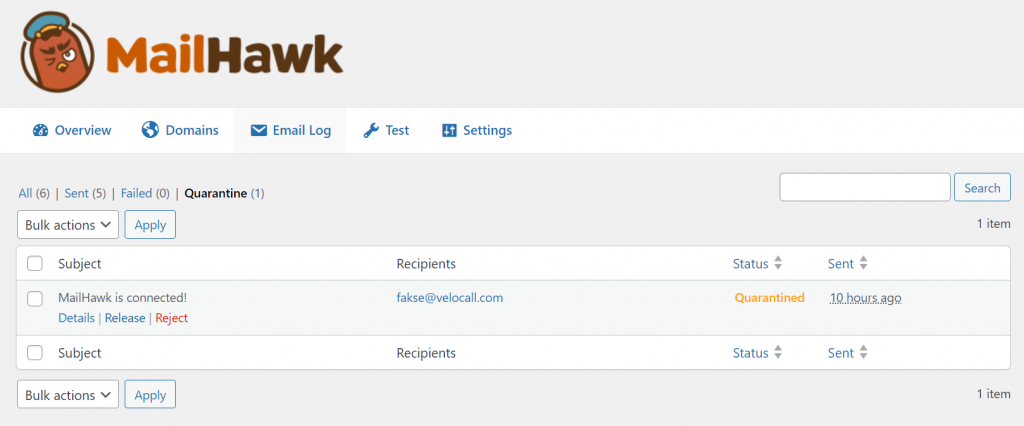
When MailHawk quarantines an email a notification will be sent to the admin notifying them that there are emails in the log that need to be reviewed and released. To avoid flooding your inbox, you’ll receive at most one notification a day.
Quarantined emails are always kept in the email log, even if you have disabled email logging, so there is always something to review. From the quarantine log admins can:
- Release the email, which sends it right away.
- Release & Trust the email, which sends it and trusts its recipients so their emails are not quarantined again.
- Reject the email, so it is never sent, or Reject & Unsubscribe to also unsubscribe the recipients.
These actions are also available in bulk. Only emails that are still in quarantine can be released or rejected, so an email can’t be released twice.
Unreleased messages are automatically rejected once they are older than your log retention, but never sooner than 30 days. This gives you time to review them even if your log retention is short.
What factors impact the risk?
Based on the 1,000,000s of emails MailHawk has sent we created a list of popular free inbox providers and assigned a relative risk for each.
For example, gmail.com has a relative risk of 2, yahoo.com a relative risk of 3, and sbcglobal.net has a relative risk of 4. We’ve assigned risks based on the percentage of bounces and failed deliveries we’ve encountered when trying to deliver to these free inboxes. We’ve encountered email lists with many recipients belonging to once-popular, but now-defunct inbox providers such as netscape.net. Many of the domains we’ve collected have a risk factor of 5 because they have an 80%+ rejection rate.
These days 90% or more of the population relies on Gmail, Outlook, iCloud, Yahoo, or GMX. If your list includes a high percentage of free inbox providers outside of the most popular like the ones listed here it’s likely your list is low quality, stale, or just old.
We will continue to monitor and update the relative risk assessments for free inbox providers over time.
Business domains, like team@mailhawk.io have a risk of 0.
Site-specific details will also impact the risk factor:
- If there is an associated user for the intended recipient the risk factor is reduced.
- Emails to your site’s admin email address are never quarantined.
- Generic role inboxes like
info@,support@orsales@are shared by many people and collect more spam complaints than a person’s own address, so they add a little risk.
Trusted addresses, bounces, and spam complaints
MailHawk learns about your recipients from what happens to the emails you send.
- Trusted addresses are never quarantined. You can trust the recipients of a quarantined email with Release & Trust, or add an address yourself from the Recipients page in the MailHawk admin.
- Hard bounces add risk to an address. One bounce adds to the doubt, and repeated bounces quarantine the emails to that address. A bounce is forgotten after 90 days, because addresses get fixed. A bounce also removes the trust from an address.
- Spam complaints are taken very seriously. When a recipient reports one of your emails as spam, emails to that address are always quarantined and the address can’t be trusted again.
The Recipients page lists every address MailHawk has learned something about, and you can remove an address from it at any time.
If you’re using Groundhogg…
MailHawk will look at information available through Groundhogg to calculate risk as well. MailHawk will observe prior email activity, page visit history, and contact info. The risk factor will be increased or decreased respectively. For example, a contact who has recently opened or clicked your emails is less risky, and a contact whose name matches their email address is less risky than one whose doesn’t.
New contacts haven’t had a chance to engage with your emails yet, so for the first 30 days after a contact is created the lack of opens and clicks isn’t held against them. Importing a list and sending your first email should no longer quarantine large numbers of emails purely because the contacts are new. Contacts that stay unengaged after that period become riskier, and the assessment is refreshed weekly as their activity changes.
Before importing your list and sending a broadcast we recommend running your list through a verification tool like ZeroBounce to remove stale or invalid emails.
Over time as you engage with your subscribers the system will learn and fewer emails will be quarantined.
Is quarantine optional?
No, quarantine is compulsory for all MailHawk users. Over time as the system collects more data and information we’ll be able to add additional factors and adjust the risk factor algorithm resulting in fewer false positives.
To prevent large numbers of quarantined emails, practice good list hygiene and remove inactive subscribers from your list regularly.
Still stuck? Open a support ticket and we will help.