
Documentation » Using MailHawk
Resend an email
On this page
Need to send a previous email again? You can resend a retained message from the Email Log. Check what happened to the first copy before doing so: a resend can arrive as a duplicate.
This guide covers Sent and Delivered messages. For a failure, see Retry failed emails. Held messages need quarantine review instead.
Check the original message
- Go to Tools > MailHawk > Email Log.
- Find the recipient and subject.
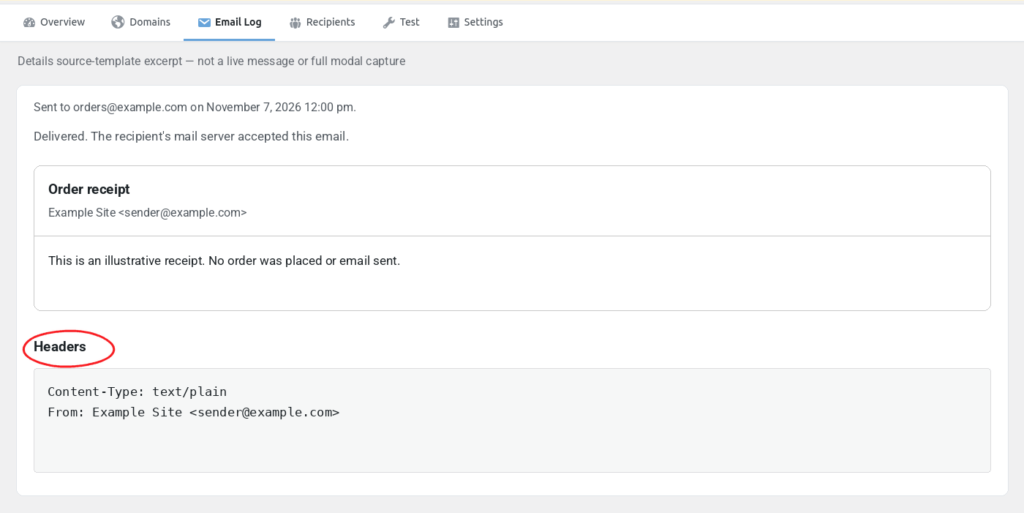
- Hover over the row and click Details.
- Check the recipients and content, and confirm that another copy is appropriate.
Sent means MailHawk accepted the original attempt; its final outcome may still be pending. Delivered means the receiving server accepted it. Ask the recipient to check spam and other folders before resending a Delivered message.
Resend the message
Hover over the Sent or Delivered row and click Resend. This makes another sending attempt to the message’s saved recipients; it is not an editor for changing the address, subject, or message.

Attachments are not reconstructed by this log action. If the message needs attachments, generate a fresh email in the original application.
Check the resulting log status and receiving inbox. Service acceptance does not guarantee inbox placement, and a new attempt can still fail or be refused.
If the original address or message was wrong, correct it in the application that created the email and send the appropriate new message there. Do not resend an old password-reset link or other time-sensitive content without checking whether it is still valid.
Why is Resend missing?
The row action depends on its status. Failed, Bounced, and Delayed rows use Retry. Quarantined rows use Release and review actions.
An entry deleted under log retention is no longer available to resend from that log. Resending an existing entry updates its send time for retention purposes, so it is not an immutable history of every attempt.
Do not use resend to bypass a spam complaint or to repeatedly send to a bouncing address. Resolve the underlying problem first.
Still stuck? Open a support ticket and we will help.